Build a local Google Drive index for AI agent document search
Most people already have a useful knowledge base: a messy cloud drive full of PDFs, forms, receipts, spreadsheets, and exported documents. The hard part is making that material searchable by an AI assistant without pasting private files into every conversation.
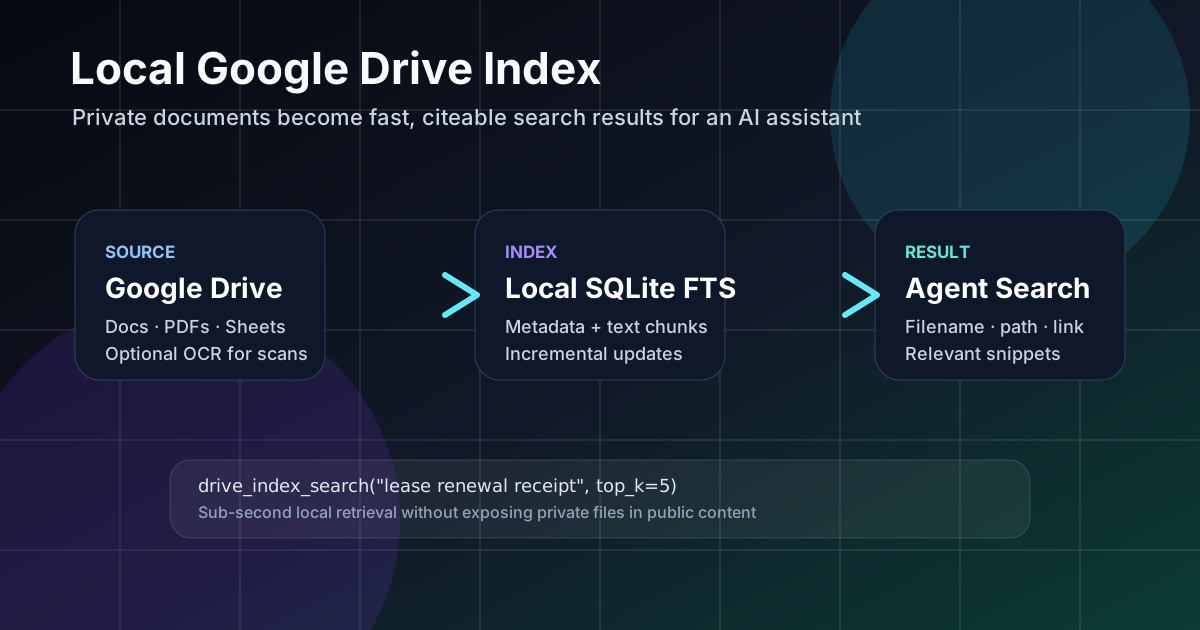
A local Google Drive index solves that middle layer. It syncs document metadata and extracted text into a local search database, then lets the assistant answer with filenames, paths, links, and snippets instead of guessing.
Project link: the implementation is published as gregoryhorn/hermes-drive-index on GitHub: a local Google Drive full-text search index and Hermes Agent plugin powered by SQLite FTS5.
The problem: cloud search is not agent context
Drive's own search is useful for a human clicking around. An AI agent needs a different shape of result: a ranked list with document names, paths, stable links, and short snippets that can be cited in a response. It also needs to know when a match is only metadata, not full text.
Without that boundary, assistants either ask the user to upload files manually or over-claim from filenames. Neither is good enough for operational work.
The architecture
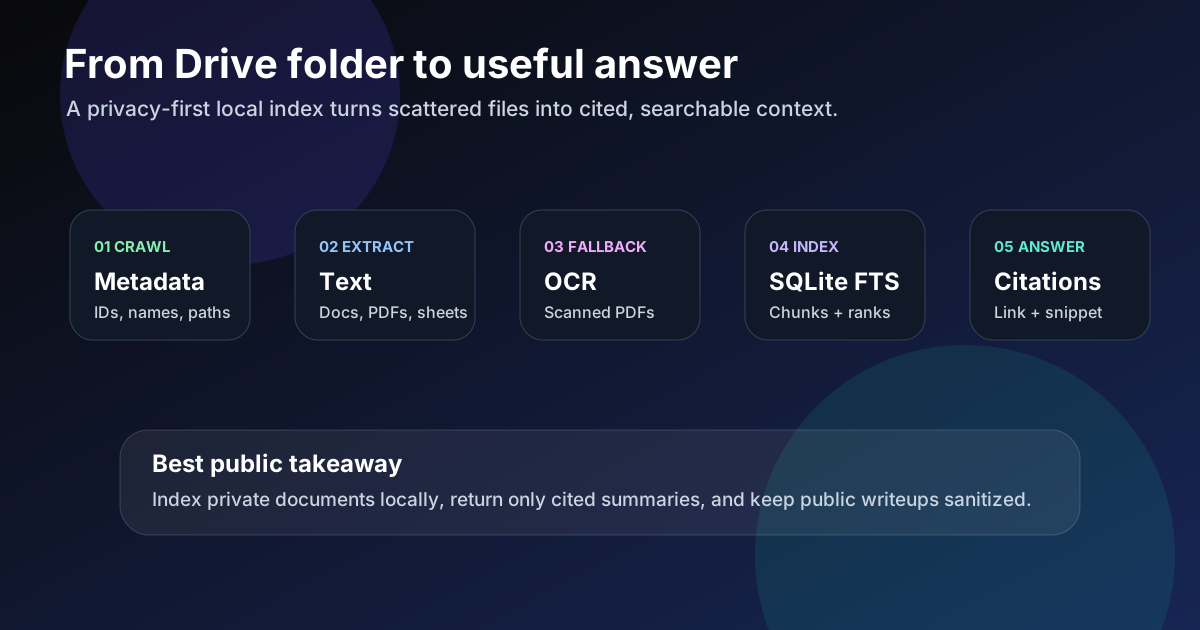
The tool follows a simple local-first pattern:
- Crawl metadata: record file IDs, names, MIME types, paths, modified times, and links.
- Extract text: export Google Docs/Sheets where possible and parse PDFs or text-like files locally.
- Use OCR as a fallback: scanned PDFs can become searchable when OCR is explicitly enabled.
- Index locally: store metadata and text chunks in SQLite full-text search.
- Return citations: answer with file name, Drive path, web link, and a relevant snippet.
Why local indexing helps
Local indexing keeps search fast and controllable. A scheduled incremental update can compare a manifest of Drive files and avoid downloading unchanged documents. The assistant can search in milliseconds during a conversation while the slower cloud sync happens in the background.
It also creates a clean privacy boundary. The public write-up can explain the architecture, but the actual file names, snippets, Drive links, and personal documents remain private.
What good results should include
A document-search tool should not just say "found it." Useful results include:
- the file name;
- the Drive path or folder context;
- a web link for human verification;
- a snippet from the matched text when full text was indexed;
- a warning when a result matched only by metadata.
Copyable Hermes setup prompt
If you want a human or another Hermes instance to set up the repository as a working local Drive-search tool, copy this prompt into Hermes. It includes the practical installation path, privacy boundaries, and verification checkpoints.
Install and configure the Hermes Drive Index tool for this Hermes Agent instance.

Repository:
https://github.com/gregoryhorn/hermes-drive-index

Goal:
Set up a private local Google Drive document search index for Hermes Agent, backed by SQLite FTS5, so Hermes can use:
- drive_index_search
- drive_index_status
- drive_index_update

Important privacy rule:
Do not print, commit, expose, or summarize private Google Drive folder IDs, document links, snippets, tokens, local DB contents, or indexed file contents unless I explicitly approve. Treat the local index as private user data.

Steps:

1. Inspect the current Hermes install. Determine whether Hermes is installed via pipx, source checkout, or another Python environment. Identify the Python environment into which the package should be installed. Do not guess; verify with commands.

2. Clone the repository. Suggested location: ~/src/hermes-drive-index. If the directory already exists, inspect it instead of recloning blindly.

3. Install the package into the same environment Hermes uses. If Hermes is pipx-installed, prefer:

   pipx inject --editable hermes-agent ~/src/hermes-drive-index

   Otherwise, from the repo directory use:

   python -m pip install -e '.[test]'

   Verify the CLI is available:

   hermes-drive-index --help

4. Create the local config file at ~/.hermes/drive_index/config.toml using this shape, replacing placeholders with real local values:

   root_folder_name = "Personal Files"
   root_folder_id = "MY_GOOGLE_DRIVE_FOLDER_ID"
   base_dir = "/home/MY_USER/.hermes/drive_index/personal_files"
   db_path = "/home/MY_USER/.hermes/drive_index/personal_files/index.db"
   ocr_enabled = false
   ocr_image_enabled = false

   If you do not know my Google Drive folder ID, ask me for it. Do not invent one.

5. Enable the Hermes plugin in ~/.hermes/config.yaml by adding drive_index while preserving existing plugins:

   plugins:
     enabled:
       - drive_index

6. Run the health check:

   hermes-drive-index doctor --json

   If authentication or Google Drive access is missing, stop and tell me exactly what is needed.

7. Build the first local index:

   hermes-drive-index build --mode weekly_full --json

   Summarize only safe metrics: files scanned, indexed, full-text indexed, metadata-only indexed, skipped, failed, and duration. Do not paste private filenames, snippets, or Drive links unless I approve.

8. Verify CLI search and status:

   hermes-drive-index status --json
   hermes-drive-index search "test" --json

   For search results, only confirm that results are returned or not returned. Do not expose private snippets or links.

9. Verify Hermes plugin availability. Start a fresh Hermes session, or tell me if the gateway needs to be restarted before tools appear. Confirm these tools are available: drive_index_search, drive_index_status, and drive_index_update.

10. Final report. Include repo path, install method, config path, doctor status, index build metrics, CLI status/search result, Hermes tool availability, and any remaining manual steps.

Optional OCR:
Do not enable OCR by default. If I explicitly ask for OCR later, PDF OCR uses ocrmypdf and image OCR uses tesseract. Image OCR should stay off unless folder-scoped, to avoid indexing personal photos. Missing OCR tools should be treated as non-fatal and should fall back to metadata-only indexing.

Success condition:
Do not claim setup is complete until the package is installed, the config exists, doctor passes or the missing prerequisite is clearly identified, the index has been built or a specific blocker is documented, and the Hermes plugin tools are verified or the required restart/new-session step is clearly stated.
Short design prompt
Design a local document index for an AI assistant. Separate cloud crawl, local extraction, OCR fallback, SQLite full-text search, result ranking, citations, incremental updates, and privacy boundaries. The assistant must distinguish full-text matches from metadata-only matches and must cite filenames, paths, links, and snippets.Google Drive indexAI document searchSQLite FTSOCR